
Geo STUDIO Pro 3.4 Release Notes
⦁The application & Geo format VERSION have increased to 3400 (3.4)
⦁The Mesh node has a new Mesh Type: GEO_MESH_TRIANGLES. The mesh vertex data is interpreted as sequencial triangles, so vertex 1,2 and 3 define triangle 1, vertex 3, 5 and 6 define triangle 2 and so on. A Mesh node of of any type (i.e. TRI_STRIP, FAN or TRIANGLES) can be converted into Polygons (Triangles) with the Unstrip (Decompose) Mesh tool. This feature was added because we encountered some file formats that define their geometry this way (i.e. as non-indexed triangle lists).
⦁Fixed a bug that caused Geo to crash if you selected a PrimSet Node (while in Face pick mode) and invoked the Degenerate PrimSet tool (to convert the PrimSet into a collection of Mesh nodes
⦁Fixed a bug in the texture palette that could result in some textures not being displaying in the palette. This is no longer the case.
⦁If a model was loaded that contained a huge number of vertices (e.g. we encountered a mesh with > 150k verts) then the Geo STUDIO tree view would slow the application down to an unusable level or crash. This has been fixed and no longer happens - allowing Geo to continue updating in real-time without issue.
⦁Fixed some bugs with LightPt rendering. Highlight rendering of the LightPt Node and highlight rendering of LightPt vertices was broken. This works now.
⦁The Rotate tool now implements the geoTool base-class functions: fitSelection and getCurrentPosition. The former allows you to fit/zoom on the currently being rotated geometry (mid-tool) when you press the 'f'-Key, and the later will jump the Grid origin to the currently active grabber position (by pressing the 'q-Key'). If you recall from Geo STUDIO 3.3 release-notes, pressing the 'w-Key' will cycle snap-orient the Grid between the XY, XZ and YZ-planes - allowing you to move the currently-active grabber seamlessly along the newly-oriented Grid without the need for existing geometry to snap onto.
⦁The Preferences dialog has been modified and re-arranged slightly with the introdiction of a new GUI-Prefs tab for UI-related preferences.
⦁New GUI-Prefs for the Message Info Dialog has been added: (1) Whether to post geoGui::statusBar messages to the Message Info Dialog and (2) How many messages need to happen before they are all cleared. The first was introduced in case the user missed an inital tool instructional message on the StatusBar and the second was because previously, every time the Info dialog was opened - the previous message list was cleared. The default Message Info pref is to add StatusBar messages to the dialog.
⦁Fixed a bug in the Slice tool that caused a crash in some circumstances.
⦁The Splash-Screen now cycles through, and displays, a different background images with each start-up.
⦁The PrimSet node is now recognized, and works with, modification tools like Translate, Rotate, Scale-Along-Vector etc.
⦁Reparenting a sub-graph in the tree view used to only move the RenderGroups (and below) and not the intended hierachy rooted at the Grouping node being dragged and dropped in the tree view. This has been fixed.
⦁A Group Node property allows you to display the Group's Bounding Box (which is the extents of all its children) was disabled internally by mistake. This is re-activated. Furthermore, this display correctly takes into account any Group Transforms now.
⦁Added 6 simple GeoScript plugins that cull Poly-Types from the current selection list if the angle between their Face-Normal and any major axis (i.e. +/- X,Y or Z) is greater than a user-specified tolerance (in degrees). This can come in handy if you are plane texture mapping and don't want to mistakenly map polys that are mostly vertical to the direction of mapping. These can be found in the Select Menu and Toolbar. They are also provided as GeoScript source examples
⦁Added some simple LODing to the Grid display - minor grid lines are not shown after 20 Grid cells (-10 to 10 units in either axis).
⦁Found and fixed a spectacular bug when you deleted the last material in the material palette and immediately created a new Extended Material.
⦁There was an initialization memory bug found in the Define Axes Tool. This tool was invoked by the Behavior System when you added a DCS Action (a Dynamic Coordinate System) to a behavior. The DCSAction within the behavior system is like a DOF (Degree of Freedom) Node on steroids! :-)
⦁Found a Severe bug associated with setting up the number of Texture Units available. The bug was writing into memory outside the bounds of the Geo Header node's Texture Unit array and could lead to program instability and crashes (especially around file format import and export). It has been fixed with Geo limiting itself to 8 Texture Units - regardless of how many (above 8) the GPU supports.
⦁Overhauled the use, display and tool interaction with Group Nodes that contain a Transform List (any combination of general 4x4 Matrix, Scale, Rotate and Translate transformations that act on the Node's children). Previously, although supported in Geo, it was a not fully integrated with all tools and modes. Handling of transformed geometry is much much better now.
⦁The 3-View template tool has been improved. This tool simply creates 3 polygons (top, side and front) which are constructed to the user's entered values for height, width & length. Previously you had to individually texture map these polys to display the reference images that you would use in modeling something from blueprints. Now you can enter the relevant texture palette index for each plane and dynamically tweak it within the tool to align the texture properly. The tool creates a box to the entered dimensions and the user can select which side is best for the image.

⦁Fixed a bug in the material Editor when editing Basic Materials. If you changed the Diffuse or Specular components (which are also reflected in the model) and then clicked the Material Editor Cancel button (to revert the editor changes) - this didn't happen with your unwanted Editor changes being applied to the edited material. It correctly reverts the material now.
⦁Added 3 simple (but useful) GeoScript plugins - Select by Material, Select by Texture and Select by Material & Texture. These will select all faces that match the input material and texture palette indicies. Note: if you load a GeoScript in the built-in Script Editor, you can modify, saveas and run it if you need different logic.

⦁Sometimes (depending on the code path executed) when a textured model was loaded - and texture display had been off - the model was displayed untextured. If you were new to Geo STUDIO that wasn't comforting!. That no longer happens.
⦁Deleting a texture from the palette did not remove the texture reference from any Extended Material in the material palette - This resulted in a crash if the material was later opened for edit. This bug has been fixed.
⦁Revamped the Texture Palette with larger thumbnails, revised menus and new functionality. Most image formats have their origin at the top left but OpenGL has its origin at the bottom left. This means that either there is a flip on Y done in the image format loader or the image itself is flipped. Unfortunately there's no consistency. To help with this, the Texture Palette has new tools that allow the user to manually flip single or all palette textures.
⦁We did a lot of work in this release improving the Undo System. The Undo menu finally identifies what the undo operation would be (and if the menu is simply "Undo" - then you known the Undo buffer is empty). A lot of bugs were fixed during this task. It's nice to a long sequence of major scene graph changes unwind, in reverse order.
⦁There is a new Fast-Path Renderer built in. It is a 'Poly' level attribute which isn't quite as dumb as it sounds :-) since (in Geo) there are PrimSet Nodes which can contain many (hundreds/thousands even) strips and triangle lists. There is a new Optimize Plugin to turn it on/off globally. The fast-path renderer seamlessly reverts to the edit-time renderer whenever it is the source or target of a tool. We developed this solution after seeing the effect of importing some high poly count (non-real time) models that brought performance to a standstill. As an example: one model went from 1.7fps using the edit-time renderer to 35fps with the fast-path renderer.
⦁Probably the biggest new feature with this release is the addition of GLTF support! GLTF is the (open)GL Transmission Format - it is an incredibly powerful and flexible modern file format. and support for it has resulted in many knock-on changes and improvements throughout Geo.
⦁GLTF support comes with a new PBR (Physically Based Rendering) Material model and PBR shader to handle this. Here's a snapshot of a loaded GLTF model and its new Material Editor...

⦁This release supports static scenes and the baseline GLTF 2.0 material specification. Support for animation and many of the material extensions will come in Geo STUDIO version 3.5 (in a few months time) .
⦁We believe our support of GLTF and the GLB Binary format models is very complimentary to our existing OpenFlight, DWB and Aechelon solutions. It will certainly bring a new level of model fidelity to the world of Simulation and Training.
⦁Here is another example of an imported GLTF model...

⦁Modified the OpenFlight, DWB, Aechelon, Obj and VRML exporters so they can handle PBR materials gracefully - as well as a loaded texture not coming from an image file. This is because glb holds all resources internally within the single glb file. Once loaded into the Geo texture palette they can be written back as image files- allowing a glb import and export path to multiple alternative file formats.
⦁Please note that since we didnt tackle animation or any of the many material/node extensions, that may effect your success rate. It is however an opportunity to let us know what additional features you require so they can be prioritized.
⦁The Planar-Map (3 point texture map) tool has been revised to give more control and power during the mapping process. The in-tool GUI has been updated as shown below...

⦁The Tube tool has also been updated to help building models in tubular sections. There is more control of tube sections and tube section points now. The in-tool GUI has been updated as shown below..

⦁Geo no longer adds a default (Basic) Material whenever you create a new file. This is no longer necessary for a number of reasons. The biggest problem was that the material was also added when importing files and if you saved and loaded that file a number of times - your material count would steadily grow! Not the best situation, but fixed now.
⦁On a technical note we have switched from using the GLEW (GL Extension Wrangling ) library for function loading to one called SLED (originally authored by Sean T. Barrett). SLED generates only the functions required/available for the OpenGL version that you are targeting - making things much simpler and smaller.
⦁After burning the midnight oil and refactoring geoMemoryMgr (ensuring a single point of C++ memory allocation/deallocation overrides in the application) we believe that we've made a significant improvement in the overall stability of the product - especially if you were doing a lot of file import, closes, and exports.
⦁As a result of the above changes - Geo can now detect and recover from an "Out of memory" error. This can happen when loading files that push the working memory of the application beyond 3GB (or 2GB if a contiguous memory request can not be found in the remaining memory space). If this happens Geo will abort the current load and inform the user (suggesting they close an existing file and try again). In addition Geo will recover the memory that had already been allocated up to the point of encountering the OutOfMemory failure.
⦁Fixed a number of issues with the Aechelon Hie importer related to finding and loading textures in Aechelon's TX format.
⦁The LOD node can now switch on screen coverage as an alternative to switch on distance. When you turn on "Automatic mode" the distance to model and model's screen coverage values are displayed in text over the 3D viewport - making it easier to check (or define) appropriate value for either LOD types. In addition the tree view now visually keeps in sync with the changing LOD's (it did not automatically refresh and show this previously).
⦁Following this release we intend to propose a vendor GLTF extension called GEO_LOD for bringing traditional GeoSTUDIO/OpenFlight per-part LODs (i.e. all LOD's contained within a single file) to GLTF. This release does not expose/support that currently - but if there is community acceptance the next release of Geo will be able to export Geo/OpenFlight/Aechelon databases in a structurally similar GLTF file.
⦁Added a useful Save Normal Map... command to the texture palette command menu. This saves the current texture as a normal map. For example an OpenFlight model was loaded and a normal map generated from the base texture. A PBR material was created and applied in a few clicks using the base texture and the generated normal map to give the following result..

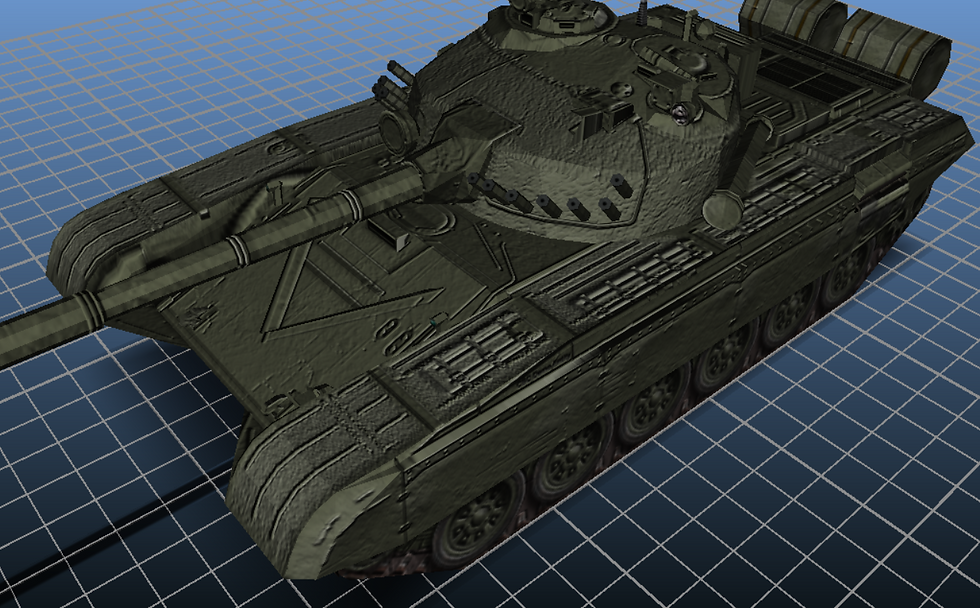
While not intended to replace a "proper" high-quality normal map (as created manually in something like Photoshop or Gimp) - this quick automatic approach will suffice in many cases.
Creator, and OpenFlight were developed by, and are registered trademarks of, Multigen-Paradigm (MPI) & currently maintained by Presagis Inc.


Comments